So I'm going to start with the process for my final project. Maybe I'll post some of the other stuff too if you want to see some unfinished effects. Basically I have been in this effects class for the last couple of months working on different effects. Effects are procedurally generated animation. For example: smoke, fire, explosions, buildings collapsing, etc etc etc. Pretty much anything can be done with effects. Here's the work flow for my project:
I'm working like crazy on the cloth renders for Papa and most of my work is done on bug fixing at this point and single shot fiddling. Usually people just show the polished perfect animated film but most of my time I stare at things like this until it finally looks ok. That's why I thought it would be funny to show you a few of the problems that I sometimes run into working on the characters skirts:
Exhibit A: I call this the Loincloth-Mindy. Mindy is the main female character of Papa and let me promise you, she's not as permiscuous as this picture makes her out to be. Turns out she was in one spot in one frame and then 10 yards away in the next frame. Well the skirt I set up is attached to her waist and tried to travel at the speed of sound while holding on for dear life to her waist. I guess the path of least resistance is straight through her. (note: the actual math would have stopped, then magically moving at 490.91 mph then instantly stopped again. My diagnosis: fatal)
Exhibit B: I call this one Backless-Chaps-Papa. This is a tougher issue to pinpoint. I'm not sure exactly what happened, something about the way that he moved lead to this. The Skirt kinda explodes. It kinda looks like fireworks in my view (see below) but I try to smooth it out a little bit before rendering which is why the image above doesn't look anything like the one below but believe it or not they are exactly the same frame.
Here's a little render of what it Papa looks like after this issue comes up if I were to render out the entire shot. Of course, I'm not going to so you don't get a background. Mostly because rendering out the entire shot would take forever:
This is a solution that I found that makes the skirt a little less excited to be alive, and a little more like cloth should actually look like:
I leave you now with a picture of what I have named Papa-after-meeting-Liam-Neeson. Also a huge problem with the cloth appears. Don't worry, this happens off screen so it's ok that he looks like that.
This is our workaround for the problem of exporting a maya alembic file into houdini and then tyring to rig a cloth sim to it.
Tab in a geometry node, Dive in and tab in an alembic node.
Click on the alembic node and select the alembic file that will
eventually be your deforming geometry. Tab in a convert node that will
convert the file into houdini polygons by default. Connect the alembic
node to the convert node.
tab in another
geometry node, (this one will be your cloth object). On the cloth
object, you may need to drop in a sort node to reorganize the points "by
Y". You do this by diving into the cloth object, turning on your point
numbers (on the toolbar right by the perspective view) and if they are
not obviously organized, tab in a sort node. Click the view button on
the sort node and then under the point tab, select "by Y" on the drop
down menu and then click the "reverse" checkbox if you want it to go
from top to bottom.
Open up your cloth tab, then select your cloth object, select your deforming collider, then attack to body.
Oh how much time I put into this and how bad it still looks. Oh well. The point of the project was to learn how to draw things procedural-ly. That means that I don't paint any of the colors on, instead we use a node network to create the colors using built in math. What's a node network you ask?!
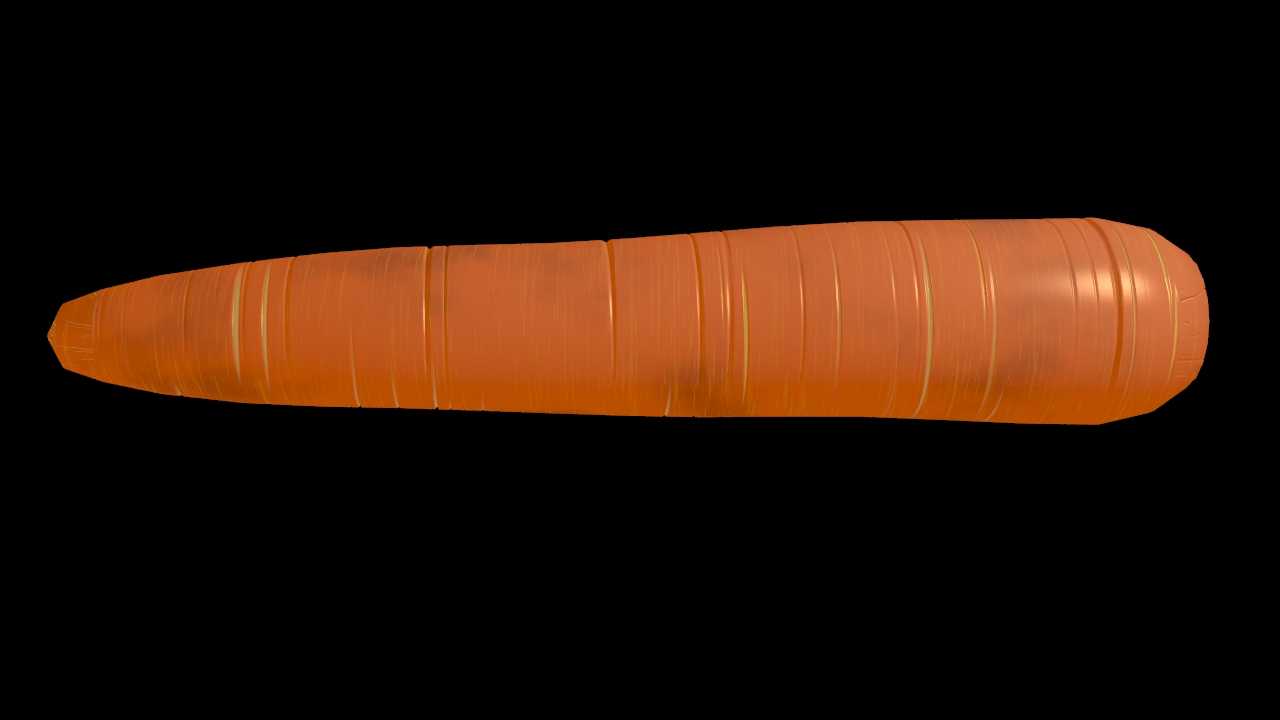
See that ugliness that looks like an evil graph? That's a node network. Each little square mathematically determines parts of the render. Some of them make random noises (like the bruising on the carrot), some of them make random vertical lines (like the yellowish streaks), and some of them make the texture (like the cracks in the carrot). Its hard making a carrot without being able to paint anything or use any of my usual approaches. The result was ok, I guess, but not as good (or as bad) as some of the other fruit in the class. Here was the process.
Basically the process went: Colors, Texture, Lighting, Redesign the model, Final Changes, Video. Enjoy
I've gotten a surface pro 3 and a trial version of photoshop. My assignment was to make a photo realistic carrot (eventually). Of course I don't know much about photoshop so this is my first ever photoshop project. I'm sure there's some really cool tricks that I could use if I knew more but hey I'm pretty satisfied with the end result. Hopefully this is good enough! I used a bunch of layers stacked on each other. I kinda skipped a few of the layers but here is the progression in general.
So hopefully that is adequate. It's not perfect but it is certainly a start! I hope that the critique tomorrow is soft on me but also helpful! I also have a little clip of some animation I've been working on. I'll post it later.
So I finally finished my first Animation class. Here are some of the pictures of what I did. It was only 7 weeks with one class period per week. Most of the learning happened on the fly. I don't think either of the images are finished completely but at lease it shows what I've done with my time.
Above is the software running. Those are my legos when I finished the models with some default coloring that I would eventually change so that it looked better and more complete. Below is the finished Render.
After I finished my Lego people I began to work on an insect. The black I chose was a mistake so lots of the detail that I put into the legs was completely lost... I plan on going and painting him again to see if I can't get a better image. Plus I want to pose him so that he's not just perfectly standing but his legs won't be mirrored.
I have been working on making the same character multiple times. I think its called persistence of image or something along those lines. I'm not sure... Anyways, without further ado, here is the project.
This is about the only way I can stay awake during computer science. Its 2 hours long and its just watching our teacher program while he explains why he's programming to us. Here is just a small doodle.
Also just because I can. Here's a balloon animal I made at work. Its Darth Vader's Helmit!
So Yesterday I received the email I have been nervous about receiving for about 5 years. The BYU Animation department wins the College emmies pretty much every year and get personal visits from Pixar, Dreamworks, and Blue Sky every year. That's the good news, the bad news is that only about 30 students are admitted into the program and... well... more than that apply. 20 are accepted into the art side and 9 into the computer side. I thought my competition's odds were unfair if I had 20 opportunities to be accepted so I chose to apply for the smaller half.
Well anyways, I was doing my Spanish homework in the library when my phone vibrated telling me that I had a new email with the subject name "Pick up your Animation Emphasis Decision." Nervously I opened the email, it read:
Hi all,
The faculty have made decisions for the Animation Emphasis. Please come to the CS Department 3361 TMCB to pick up your decision letter.
Best,
Kim (who must be someone important to know)
Needless to say I abandoned my Spanish homework and began what felt like a trek across the entire Oregon trail to get to the TMCB (The Talmage Building). When I got there I hiked up the stairs and turned the corner to see another applicant opening his letter then bursting out into a huge celebration. Really, he was shouting and jumping and fist pumping and dancing down the hallway. All I could think was, "8 spots left..." Well I got my letter and (acting super chill and collected) shakily walked to the stairwell where I opened my letter. I won't deny a certain amount of fist pumping but I did not dance or scream. Inwardly though I felt like I had just won the Olympics!
Well here is some stuff from my application that I haven't shown yet. They all come from a project that I did in High School. It took a really long time! I built ever piece on the computer, designed the coaster, an found a way to get it working! After designing the coaster I built the actual coaster using real K'nex that the school district was nice enough to buy me! Well here they are. This got me an A in Senior Projects at Grandview. Without further ado:
So in a last minute cramming session, I am going to be filling my sketch book up with as many sketches as possible in the next few weeks. Not all of them will be amazing, but I like my style of drawing since I have been home from the mission significantly more than I liked my sketches before the mission. Here is a sketch of a little girl and a bear that I did yesterday. I like the bear pretty well... I just need to learn to draw little kids better. Maybe I should just draw bigger? I think that's what the biggest problem is with little kids... Or characters in general. But that's what practice is for right? I'm going to focus on drawing people at 3/4 view and I need to work on my clothing folds. I like how the hoodie looks with the simple drape folds but the sleeves need some folds to look more lifelike. Or at least less boring!
Its going to be hard to focus on drawing folds when all i really want to draw are bears now! I think I will just do a bunch of bear sketches and I will work on the folds and faces later. Bears are cool. Just so long as they don't get into your kitchen. Then bears are annoying...
These are a few of the drawings that I was working on during the weekend. They are kinda cool. This one I am proud of because I have never drawn a woman that doesn't just look like a man with long hair! So I was looking at a few profiles of women's faces. The differences are subtle but make all the difference. I need to work on hair still... but for now I am happy with it.
This is one I found in my sketch book. I liked it so I decided to work on it a little bit and just shade it differently and rework it. I may have posted it a while back... I don't even know. Its kinda a boring character but I posted it anyways.
This sunday Doug and I drew a pretty simple drawing of a man's face (we named him the Hipster Russian model). He drew the eye, ear, and hair, while I did everything else. This left me excited with the idea of lines. How do lines effect the composition. I had a lot of fun drawing heavily outlined characters with varying widths of lines. I have always liked outlines. Realism is cool up until the outlines completely disappear. Then I only appreciate it but I don't like to draw it. After working on these two drawings, I aspire to do non-outlined characters even less. It is fitting that on Tuesday we studying UPA animation which focused on escaping from the Disney style and brought outlines back where as Disney was always trying to escape the cartoony.
This one took me a little more time and I didn't draw it during church (which... makes it less embarrassing). I also put a little more effort and time into it so it looks a little more polished. I put an army beret on... just... because I wanted to. My goal for the semester is to learn how to draw hair, so I am going to bug Doug (my roommate) to show me since his hair always comes out amazing.
Finally I have mentioned my project and not shown the progress. Unfortunately that is because the progress has been very slow. Especially because I have had finals. Hopefully I can get back into the lab this weekend and continue to work on it now that my crazy weekends of unbelievable amount of work are over. Here is a quick picture of the basic frames I have been working on for the first animation (a misty 540).